Showing posts with label jQuery. Show all posts

Jul 21, 2021

Webinar Registration and Payment collection: My new C#.NET project on GitHub

Webinar registration C#.NET Code showcase project

Source Code

https://github.com/nitinjs/webinar-registration-system

Webinar Registration System

This C#.NET project allows registering for the webinars and accept payments for the registration, Payments are accepted through Stripe API This project is based on aspnetboilerplate web application framework read more

Project Setup

  1. Make sure that you update the smtp settings in the appsettings.json file
  2. Make sure you create the database WMSDb in localdb and update the EF migrations a. In package manager enter the command update-database after creating the db
  3. Update StripeApiKey in the appsettings.json file read more

Jun 24, 2018

Javascript: Not allow user to open website in multiple windows

jQuery plugin to check if current window is duplicate window,
"Stop people having my website loaded on multiple tabs"

This plugin works across all browsers IE, Firefox, Microsoft Edge & Google chrome
It checks GUID of the window against value in cookie

I have published the source code at github: https://github.com/nitinjs/jquery-duplicatewindow

var isDuplicate = window.IsDuplicate();//this call checks if current window is duplicate
Sample usage:


    This is test page,
    Click here to open another window
    

Mar 14, 2012

Posting client side variables to server using AJAX and Web Services in ASP.NET

Pre-requisites:
1. Add reference to the  JSON.NET library
2. Import jQuery in the web-page
3. Import  JSON parser - by douglas crockford

Steps:
Add a C# class in the web application project to represent posted entity data:
public class Customer
{
    string _firstName;

    public string FirstName
    {
        get { return _firstName; }
        set { _firstName = value; }
    }
    string _lastName;

    public string LastName
    {
        get { return _lastName; }
        set { _lastName = value; }
    }
    int _telephone;

    public int Telephone
    {
        get { return _telephone; }
        set { _telephone = value; }
    }
}
 
In the codebehind file of asp.net web page add a ‘public static’ method which accepts a parameter of type ‘object’, We need to make it static because it will be accessible without creating instance of the page class. More info
This method will process the data and return the result in string format

 
   //In Test.aspx.cs
   [System.Web.Services.WebMethod]
    public static string AcceptData(object jsonData)
    {
        Customer newCust =(Customer)JsonConvert.DeserializeObject(jsonData.ToString(),typeof(Customer));
        return "Server response: Hello "+newCust.FirstName;
    }
Now, Lets write the ‘SendData’ function using which we will call the above ‘AcceptData’ web method from client side using JQuery AJAX
//javascript function in Test.aspx
function SendData() {
    //Build json object from values entered in form
    var newCustomer = {
        "FirstName": $("#txtFirstName").val(),
        "LastName": $("#txtLastName").val(),
        "Telephone": $("#txtTelephone").val()
    }

    var jsonData = "{'jsonData':'" + JSON.stringify(newCustomer) + "'}";//create string representation of the js object

            //post data to server
            $.ajax({
                type: "POST",
                url: 'Test.aspx/AcceptData',
                data: jsonData,
                contentType: "application/json; charset=utf-8",
                dataType: ($.browser.msie) ? "text" : "json",
                success: function(msg) {
                    //call successfull
                    var obj = msg.parseJSON();
                    alert(obj.d); //d is data returned from web services

                    //The result is wrapped inside .d object as its prevents direct execution of string as a script
                },
                error: function(xhr, status, error) {
                    //error occurred
                    alert(xhr.responseText);
                }
            });
}
'jQuery.ajax()' function is used to asynchronously pass data to the server More Info

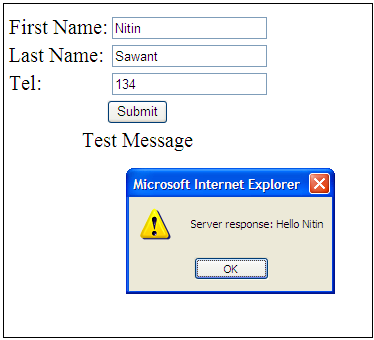
The web form
First Name:
Last Name:
Telephone:
Test Message
 
Download Source Code.rar


References:
1. JSON.NET Codeplex Project: Manipulating JSON at server side
2. WebMethod attribute
3. jQuery: Javascript library
4. Manipulating JSON at client side

Sep 11, 2011

Integrating jQuery UI Autocomplete in ASP.NET web application

Import jquery and jQueryUI and related CSS


bind autocomplete with asp.net textbox control
$(document).ready(function () {
            $("#<%=txtAutoComplete.ClientID %>").autocomplete({
                source: function (request, response) {
                    $.ajax({
                        url: "webservice/TestService.asmx/SearchData",
                        data: "{ 'q': '" + request.term + "', 'limit': '10' }",
                        dataType: "json",
                        type: "POST",
                        contentType: "application/json; charset=utf-8",
                        dataFilter: function (data) { return data; },
                        success: function (data) {
                            response($.map(data.d, function (item) {
                                return {
                                    label: item.Name,
                                    value: item.id + ""
                                }
                            }))
                        }
                    });
                }
            });
});
Declare web method inside web service
[System.Web.Services.WebMethodAttribute(), System.Web.Script.Services.ScriptMethodAttribute()]
        public List SearchData(string q, int limit)
        {
            return new List { new tdata { id = 0, name = "nitin" } };
        }

        public class tdata
        {
            public string name { get; set; }
            public int id { get; set; }
        }